오늘 한 일
- Gloddy 개발
- GDG 회의
하루 요약
- 14:00 ~ 19:30 카공
- 20:00 ~ 01:00 집공
Gloddy 개발 - useFunnel 직접 구현
useFunnel을 직접 구현해보았다. (시도해보았다)
왜? 그냥 토스꺼 쓰면 되는거 아냐?
토스에서 만든 useFunnel은 내부적으로 next/router를 사용하고 있다. 그래서 Next 13 버전에서는 사용할 수 없다.. 관련 이슈
그래서 직접 만들어보았다.
토스의 Slash 라이브러리의 useFunnel 훅을 참고하여 작성했다.
소스 코드
/* eslint-disable react/jsx-no-useless-fragment */
'use client'

import { useRouter, useSearchParams } from 'next/navigation'
import { Children, isValidElement, useEffect, useState } from 'react'

type NonEmptyArray<T> = [T, ...T[]]

interface FunnelProps {
  children: React.ReactNode
}

interface StepProps<Steps extends NonEmptyArray<string>> {
  name: Steps[number]
  children: React.ReactNode
}

export function useFunnel<Steps extends NonEmptyArray<string>>(
  steps: Steps,
  options?: { initialStep?: Steps[number]; stepQueryKey?: string }
) {
  const initialStep = options?.initialStep ?? steps[0]
  const queryKey = options?.stepQueryKey ?? 'step'
  const [step, setStep] = useState<Steps[number]>(initialStep)
  const router = useRouter()
  const searchParams = useSearchParams()

  const nextStep = () => {
    const currentIndex = steps.indexOf(step)
    if (currentIndex < steps.length - 1) {
      setStep(steps[currentIndex + 1])
      window.history.pushState(
        null,
        '',
        `${window.location.pathname}?${queryKey}=${steps[currentIndex + 1]}`
      )
    }
  }

  const prevStep = () => {
    const currentIndex = steps.indexOf(step)
    if (currentIndex > 0) {
      setStep(steps[currentIndex - 1])
    }

    router.back()
  }

  const Funnel = ({ children }: FunnelProps) => {
    const childrenArray = Children.toArray(children)
      .filter(isValidElement)
      .filter((child) => {
        return (child.props as StepProps<Steps>).name !== undefined
      })

    childrenArray.forEach((child) => {
      if (!steps.includes((child.props as StepProps<Steps>).name)) {
        throw new Error('스텝 이름이 잘못되었습니다.')
      }
    })

    return <>{children}</>
  }

  const Step = ({ name, children }: StepProps<Steps>) => {
    return step === name ? <>{children}</> : null
  }

  Funnel.Step = Step

  window.addEventListener('popstate', () => {
    const currentStep = searchParams.get(queryKey) as Steps[number]
    console.log('pop', currentStep)
    if (currentStep) {
      setStep(currentStep)
    }
  })

  window.addEventListener('pushstate', () => {
    const currentStep = searchParams.get(queryKey) as Steps[number]
    console.log('push', currentStep)
  })

  useEffect(() => {
    const currentStep = searchParams.get(queryKey) as Steps[number]
    if (!currentStep) {
      window.history.replaceState(
        null,
        '',
        `${window.location.pathname}?${queryKey}=${initialStep}`
      )
    }
  }, [initialStep, queryKey, searchParams])

  return { currentStep: step, Funnel, nextStep, prevStep } as const
}
최대한 내 방식대로 해봤다. useFunnel 훅을 사용하면 다음과 같이 사용할 수 있다.
export default function FeedbackWrapper() {
  const { Funnel, prevStep, nextStep } = useFunnel(['praise', 'mate'])
  const { handleSubmit } = useFeedbackContext()

  const onSubmit = (data: FeedbackRequestType) => {
    console.log(data)
  }

  return (
    <Funnel>
      <Funnel.Step name="praise">
        <PraiseComponent onPrevClick={prevStep} onNextClick={nextStep} />
      </Funnel.Step>
      <Funnel.Step name="mate">
        <MateComponent onPrevClick={prevStep} onNextClick={handleSubmit(onSubmit)} />
      </Funnel.Step>
    </Funnel>
  )
}
아직 구현되지 않은 부분
-
브라우저에서 뒤로가기를 눌렀을 때, step이 바뀌지 않는다.
popState로 처리해서 뒤로 갈 때는 되는거같은데 앞으로 갈 때 또 안된다.. -
쿼리스트링으로 현재 스텝을 표시해서, 새로고침을 했을 때도 현재 스텝을 유지할 수 있도록 해야한다.
-
그 외 최적화
Gloddy 개발 - react-hook-form 에러
react-hook-form의 FormProvider를 커스텀해서 사용하고 있었다.
근데 이런 에러가 떴다.
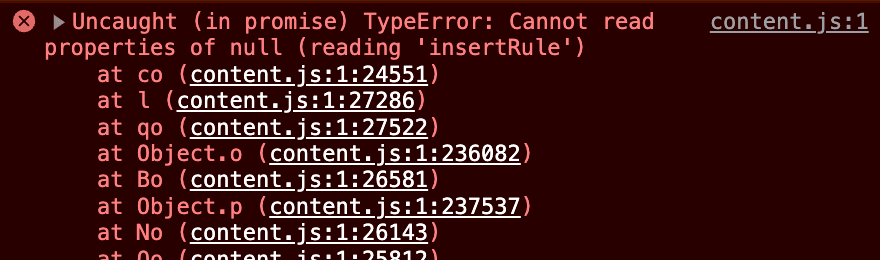
useFormContext로 formState를 가져오니까 생긴 문제였다.
원인은 정확히 알 수 없어서 일단 임시방편으로 useFormState로 control을 받아와 해결했다.
오늘은 늦었으니 다음에 다시 정확한 원인을 찾아보자..!
내일 할 일
- Gloddy 개발