← Posts

Analyzing VSCode - Undo / Redo

A deep dive into VSCode's Undo / Redo implementation

·4 min read
#open-source#opensource#vscode

들어가며

사내에서 에디터 성질을 가진 서비스를 개발하고 있다. 추가해야할 기능 중 하나로 Undo / Redo 기능이 있는데, 어떤 식으로 구현하는게 좋을지 고민하다가 VSCode의 구현을 참고하기로 했다.

VSCode는 개발자들이 많이 쓰는 IDE면서도 안정적이고 오픈소스로 공개되어 있다. 그래서 코드를 참고하면 도움이 될 것 같아 이번 기회에 분석해보기로 했다.

VSCode의 코드베이스가 굉장히 방대하기 때문에, 세부적인 기능까지 분석하기에는 한계가 있다. 이번 글에서는 VSCode가 Undo / Redo를 어떻게 구현했는지 분석하려 한다.

VSCode와 Monaco Editor

VSCode는 Monaco Editor라는 핵심 에디터 컴포넌트를 사용한다. Monaco Editor는 실제 텍스트 편집을 담당하며, VSCode는 이를 포함한 전체 IDE 환경을 제공한다.

src/vs/
├── editor/                        # Monaco Editor 관련 코드
│   └── common/                    # 공통 모듈
│       ├── model/                 # 텍스트 모델 관련
│       │   ├── textModel.ts       # 텍스트 모델 핵심 클래스
│       │   └── editStack.ts       # 편집 스택 관리
│       └── core/                  # 핵심 기능
│           ├── editOperation.ts   # 편집 작업 정의
│           └── textChange.ts      # 텍스트 변경사항 추적
├── platform/                      # VSCode의 플랫폼 서비스
│   └── undoRedo/                  # Undo/Redo 관련
│       └── common/                # 공통 모듈
│           ├── undoRedo.ts        # 인터페이스 정의
│           └── undoRedoService.ts # 실제 구현체

Monaco Editor의 TextModel은 VSCode의 UndoRedoService를 주입받아 사용한다.

// src/vs/editor/common/model/textModel.ts
class TextModel {
  private readonly _commandManager: EditStack;

  constructor(
    /* ... */,
    @IUndoRedoService private readonly _undoRedoService: IUndoRedoService
  ) {
    this._commandManager = new EditStack(this, _undoRedoService);
  }
}

사용자가 텍스트를 편집하면 다음과 같은 순서로 작업이 전파된다.
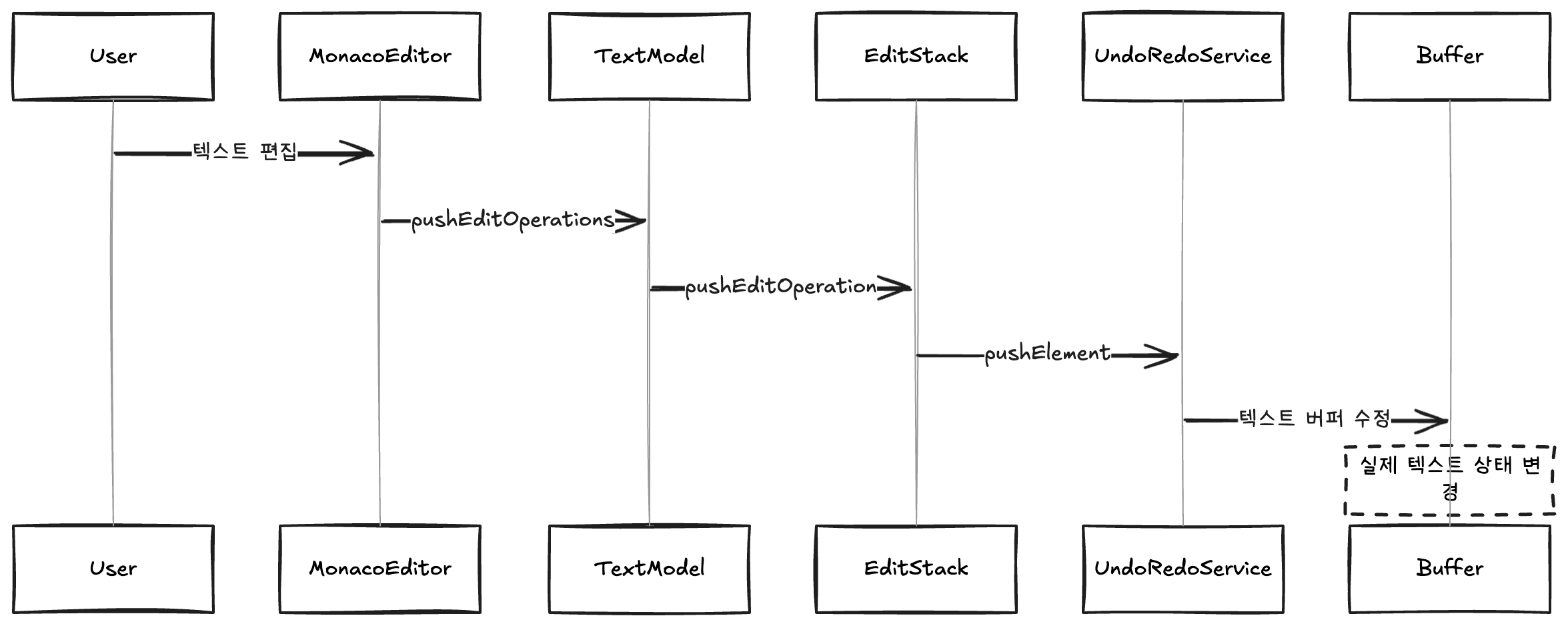
이러한 설계를 통해 여러 파일에 걸친 작업도 하나의 단위로 처리할 수 있다.

Undo/Redo 시스템 동작

VSCode는 undo/redo 작업을 각각 past 스택과 future 스택으로 관리한다.

// src/vs/platform/undoRedo/common/undoRedoService.ts
class ResourceEditStack {
  private _past: StackElement[] // undo 스택
  private _future: StackElement[] // redo 스택

  public pushElement(element: StackElement): void {
    this._future = [] // redo 스택을 비운다
    this._past.push(element) // undo 스택에 추가한다
  }
}

예를 들어 다음과 같은 편집 작업이 일어난다고 해보자.
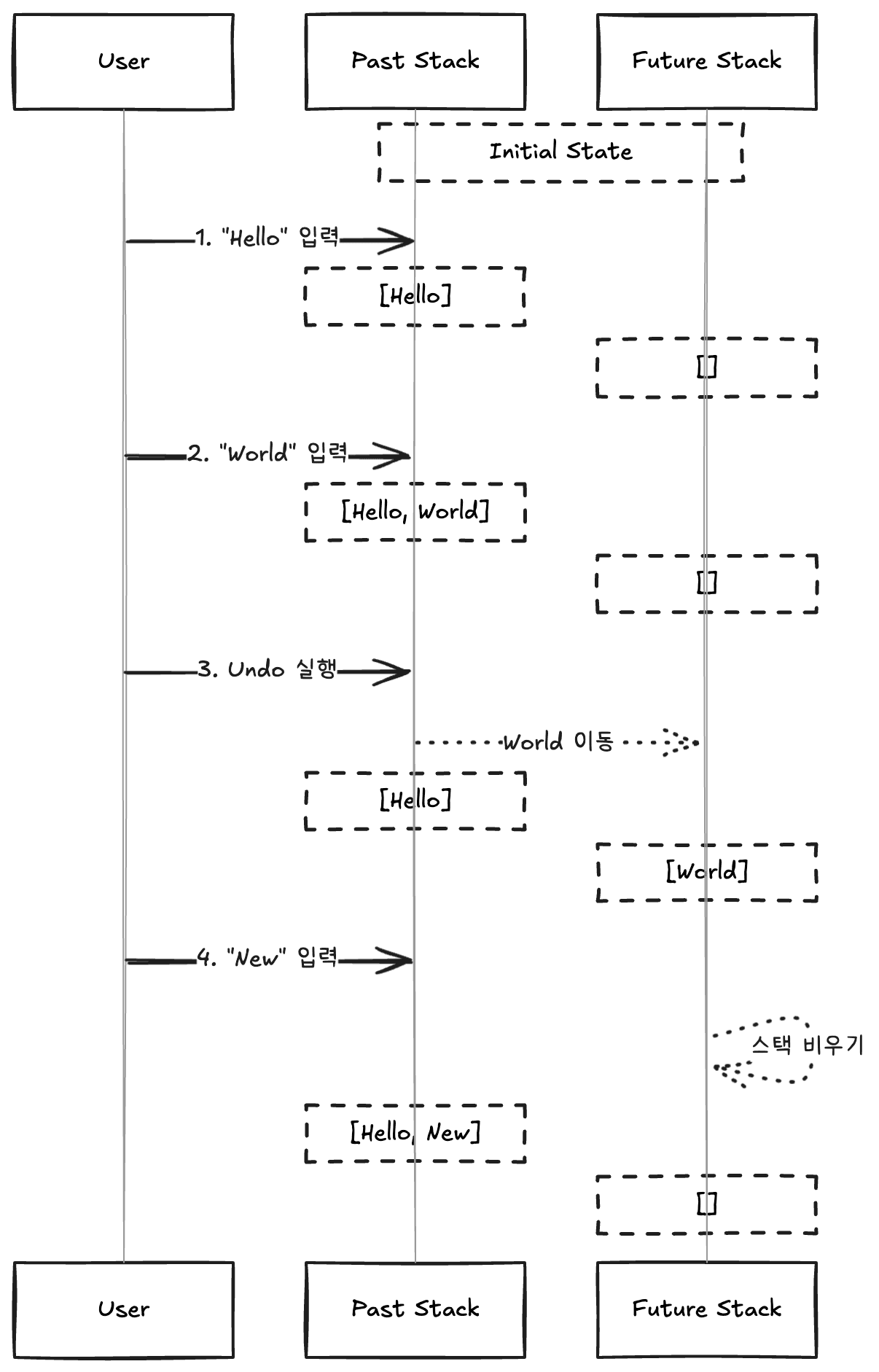
"Hello" 입력 후 "World"를 입력하면 past 스택에 순서대로 쌓인다. 여기서 Undo를 실행하면 "World"가 past 스택에서 future 스택으로 이동한다. 이 상태에서 새로운 텍스트 "New"를 입력하면 future 스택이 비워지고 past 스택에 새 작업이 추가된다.
future 스택이 비워지는 이유는 Undo 후 새로운 작업이 발생하면 이전의 redo 히스토리가 더 이상 유효하지 않기 때문이다.

Undo/Redo 실행 흐름

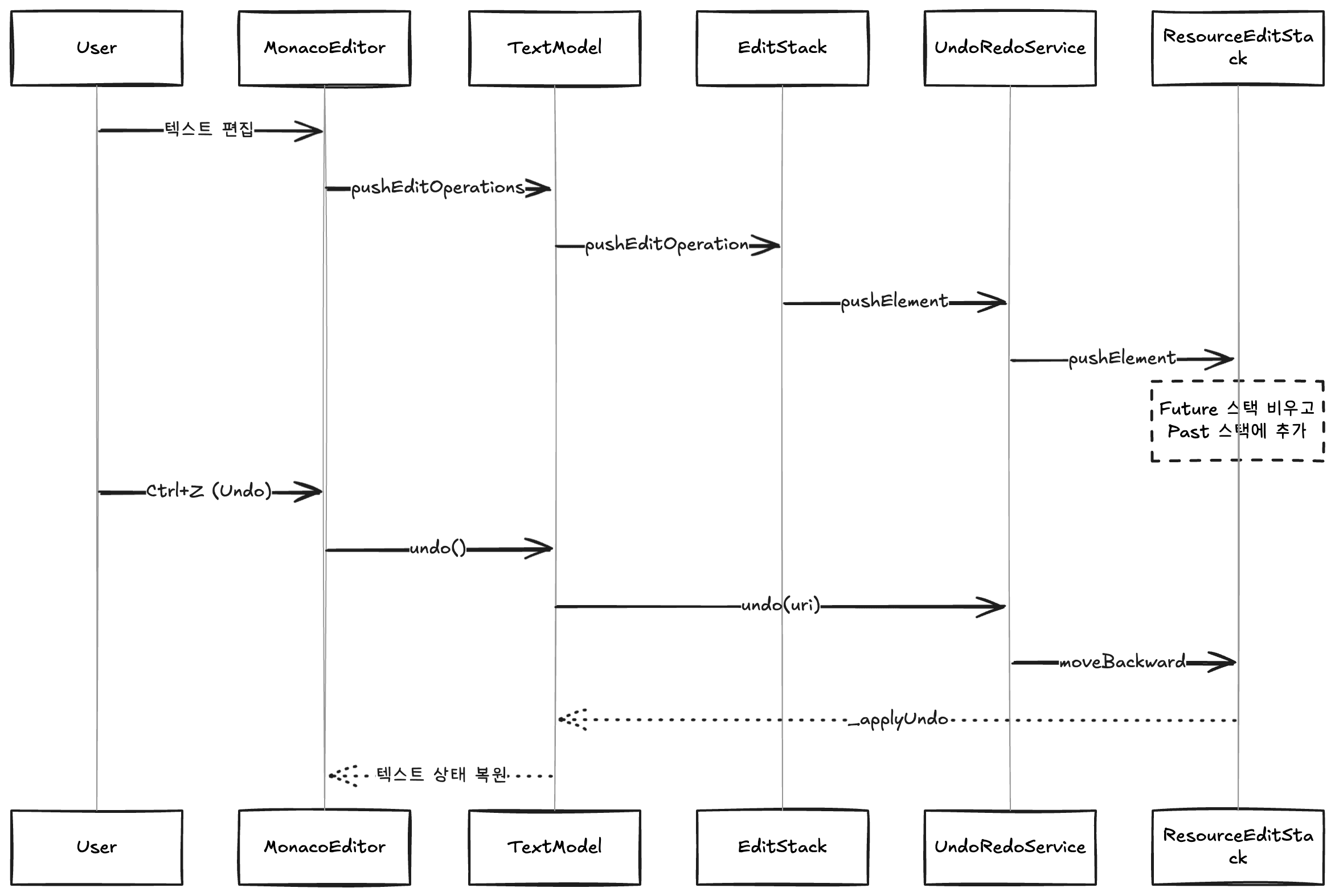
사용자가 Ctrl+Z를 눌러 Undo를 실행하면 다음과 같은 과정이 일어난다.
// src/vs/platform/undoRedo/common/undoRedoService.ts
class UndoRedoService implements IUndoRedoService {
  public undo(resource: URI): void {
    const editStack = this._editStacks.get(resource)
    const element = editStack.getClosestPastElement()

    editStack.moveBackward(element) // past에서 future로 이동
    element.undo() // 실제 undo 수행
  }
}

class ResourceEditStack {
  private _past: StackElement[]
  private _future: StackElement[]

  public moveBackward(element: StackElement): void {
    this._past.pop() // undo 스택에서 제거
    this._future.push(element) // redo 스택에 추가
  }

  public moveForward(element: StackElement): void {
    this._future.pop() // redo 스택에서 제거
    this._past.push(element) // undo 스택에 추가
  }
}

여기서 element.undo()가 호출되면 TextModel에서는 다음과 같은 작업이 수행된다.

  1. 이벤트 발생 준비 (UI 업데이트를 위한 준비)
  2. undo/redo 상태 설정
  3. 실제 텍스트 편집 적용
  4. 텍스트 버퍼 업데이트
  5. 버전 ID 업데이트 (히스토리 추적용)
  6. 변경 이벤트 발생

이러한 과정을 통해 텍스트 내용이 이전 상태로 되돌아가고, UI도 함께 업데이트된다.
자세한 코드는 textModel의 _doApplyEdits 메서드를 참고하기 바란다.

다중 파일 지원

VSCode는 IDE이므로 여러 파일에 걸친 작업도 하나의 단위로 처리해야 한다. 이를 위해 두 가지 타입의 undo 요소를 제공한다.

// src/vs/platform/undoRedo/common/undoRedo.ts
export type IUndoRedoElement = IResourceUndoRedoElement | IWorkspaceUndoRedoElement

이러한 구분을 통해 여러 파일에 걸친 변수명 일괄 변경같은 작업도 하나의 Undo/Redo 단위로 처리할 수 있다. 참고 이슈

마치며

VSCode의 Undo/Redo 시스템을 분석해본 결과, 예상했던 대로 스택 구조를 사용하여 작업 히스토리를 관리하고 있었다. pastfuture 두 개의 스택으로 undo/redo 작업을 추적하며, 새로운 편집이 발생하면 redo 스택을 비우는 방식으로 일관성을 유지한다.

더불어 VSCode의 내부 구조도 조금이나마 엿볼 수 있었다. Monaco Editor라는 핵심 에디터 컴포넌트가 있고, 이것이 VSCode의 서비스들과 어떻게 상호작용하는지 이해할 수 있었다. 특히 단일 파일 편집과 다중 파일 편집을 구분하여 처리하는 설계는 VSCode가 단순한 에디터가 아닌 IDE로서 어떤 고민을 했는지 볼 수 있었다.

이번 분석을 토대로 현재 진행 중인 프로젝트에 간단한 구조로 Undo/Redo를 구현해야겠다.

Introduction

I'm developing a service with editor-like properties at my company. One of the features to add was Undo / Redo, and while thinking about the best way to implement it, I decided to reference VSCode's implementation.

VSCode is an IDE widely used by developers, and it's also stable and open source. So I thought it would be helpful to reference the code, and I decided to analyze it this time.

Since VSCode's codebase is extremely vast, there are limitations to analyzing every detail. In this post, I'll analyze how VSCode implements Undo / Redo.

VSCode and Monaco Editor

VSCode uses a core editor component called Monaco Editor. Monaco Editor handles the actual text editing, while VSCode provides the full IDE environment that includes it.

src/vs/
├── editor/                        # Monaco Editor related code
│   └── common/                    # Common modules
│       ├── model/                 # Text model related
│       │   ├── textModel.ts       # Core text model class
│       │   └── editStack.ts       # Edit stack management
│       └── core/                  # Core functionality
│           ├── editOperation.ts   # Edit operation definitions
│           └── textChange.ts      # Text change tracking
├── platform/                      # VSCode's platform services
│   └── undoRedo/                  # Undo/Redo related
│       └── common/                # Common modules
│           ├── undoRedo.ts        # Interface definitions
│           └── undoRedoService.ts # Actual implementation

Monaco Editor's TextModel receives and uses VSCode's UndoRedoService through injection.

// src/vs/editor/common/model/textModel.ts
class TextModel {
  private readonly _commandManager: EditStack;

  constructor(
    /* ... */,
    @IUndoRedoService private readonly _undoRedoService: IUndoRedoService
  ) {
    this._commandManager = new EditStack(this, _undoRedoService);
  }
}

When a user edits text, the operation propagates in the following order:

This design allows operations spanning multiple files to be handled as a single unit.

Undo/Redo System Behavior

VSCode manages undo/redo operations using a past stack and a future stack respectively.

// src/vs/platform/undoRedo/common/undoRedoService.ts
class ResourceEditStack {
  private _past: StackElement[] // undo stack
  private _future: StackElement[] // redo stack

  public pushElement(element: StackElement): void {
    this._future = [] // Clear the redo stack
    this._past.push(element) // Add to the undo stack
  }
}

For example, let's say the following editing operations occur:

After typing "Hello" and then "World", they stack up in order in the past stack. When Undo is executed, "World" moves from the past stack to the future stack. If new text "New" is typed in this state, the future stack is cleared and the new operation is added to the past stack.
The reason the future stack is cleared is that when a new operation occurs after an Undo, the previous redo history is no longer valid.

Undo/Redo Execution Flow

When a user presses Ctrl+Z to execute Undo, the following process occurs:

// src/vs/platform/undoRedo/common/undoRedoService.ts
class UndoRedoService implements IUndoRedoService {
  public undo(resource: URI): void {
    const editStack = this._editStacks.get(resource)
    const element = editStack.getClosestPastElement()

    editStack.moveBackward(element) // Move from past to future
    element.undo() // Perform actual undo
  }
}

class ResourceEditStack {
  private _past: StackElement[]
  private _future: StackElement[]

  public moveBackward(element: StackElement): void {
    this._past.pop() // Remove from undo stack
    this._future.push(element) // Add to redo stack
  }

  public moveForward(element: StackElement): void {
    this._future.pop() // Remove from redo stack
    this._past.push(element) // Add to undo stack
  }
}

When element.undo() is called here, the following operations are performed in TextModel:

  1. Prepare event emission (preparation for UI update)
  2. Set undo/redo state
  3. Apply actual text edits
  4. Update text buffer
  5. Update version ID (for history tracking)
  6. Emit change event

Through this process, the text content reverts to its previous state and the UI is updated accordingly.
For detailed code, please refer to textModel's _doApplyEdits method.

Multi-File Support

Since VSCode is an IDE, operations spanning multiple files need to be handled as a single unit. To achieve this, it provides two types of undo elements:

// src/vs/platform/undoRedo/common/undoRedo.ts
export type IUndoRedoElement = IResourceUndoRedoElement | IWorkspaceUndoRedoElement

This distinction allows operations like batch renaming a variable across multiple files to be handled as a single Undo/Redo unit. Related issue

Conclusion

After analyzing VSCode's Undo/Redo system, it uses a stack structure to manage operation history, as expected. It tracks undo/redo operations with two stacks, past and future, maintaining consistency by clearing the redo stack when a new edit occurs.

Additionally, I was able to get a glimpse into VSCode's internal structure. There's a core editor component called Monaco Editor, and I could understand how it interacts with VSCode's services. In particular, the design that distinguishes between single-file editing and multi-file editing shows the kind of considerations VSCode made as an IDE rather than a simple editor.

Based on this analysis, I plan to implement Undo/Redo with a simple structure in the project I'm currently working on.